
Domain Availability Checker: 7 Easy Steps to Verify a Name
You’ve picked the name. The logo sketch is done, the pitch is ready, and a friend has already said, “That’s perfect.” Then you type it into a browser and find a stranger’s website sitting there. A domain availability checker spares you that moment. It tells you in seconds whether an address is free to register, already owned, or caught up in something more complicated. But a green “available” badge is only the start. A name can be free and still cause trouble. It might echo a protected brand, lack matching social accounts, or cost far more to renew than you expected. This guide covers seven simple steps, from first search to final checkout, so you buy with confidence instead of hope.
Whether you’re launching a blog, a shop, or a side project, the process is the same. Start with two or three name options, because your first choice may not survive every test. Keep a simple note with the results for each one. The steps below follow a deliberate order. Quick checks come first, so you can drop weak names early. Money and legal questions come later, once you know a name is worth the effort. You don’t need technical skills or special software. A browser, a little patience, and about an hour per name are usually enough. If a name fails at any step, move on to your next option instead of forcing it. If you want to dig deeper, our guide on Domain Name Ideas: 8 Proven Formulas for the Best Names covers this in more detail. This is a common part of dealing with domain availability checker, and it is worth keeping in mind.
Step 1: Use a domain availability checker on your top names
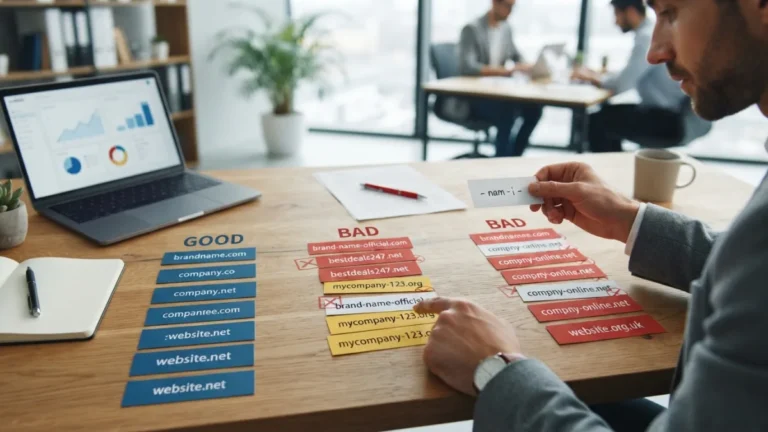
Begin with a domain availability checker. Nearly every registrar offers one on its homepage, and a few standalone sites do the same job. Type the name you want without spaces, “www,” or punctuation, then read the result. You’ll usually see one of three outcomes: available, taken, or “premium,” which means the owner has listed the name for resale at a higher price. Don’t stop at your exact spelling. Test the variations people might type by mistake, because visitors who land on the wrong address are traffic you lose. A few quick checks are worth running: Many people run into this exact issue with domain availability checker at some point.
- The singular and plural versions of your name
- Common misspellings and spelling variants
- Versions with and without hyphens or numbers
- How the name sounds when you say it aloud, since people often share domains by voice
Step 2: Run a whois lookup tool on taken names
When a name shows as taken, a whois lookup tool tells you more about it. This kind of service pulls the public registration record for a domain. You can see which registrar holds it, when it was created, and when it expires. ICANN, the organization that coordinates the domain system, offers a free registration data lookup you can use. Owner details are often hidden or redacted these days, so don’t expect a name and phone number. Even so, the dates matter. A domain registered last week is a different story from one that has sat untouched for years. Visit the address as well. A parked page or an empty site may mean the owner is open to selling, while a busy business site probably means the name is off the table. Keeping domain availability checker in mind here will save you time later on.
Step 3: Do a trademark search before buying
A trademark search before buying can save you from an expensive mistake. Owning a domain does not give you the right to use a name in business. If your address closely matches a registered brand in a similar field, the brand owner can object, and you could be forced to give the name up after you’ve built your site around it. Start with the trademark database in your own country. In the United States, the U.S. Patent and Trademark Office runs a free search tool. Look for names that are identical or confusingly similar, especially in your industry. This check won’t replace legal advice. If you’re building a serious brand, a short consultation with a trademark attorney costs little compared with a forced rebrand. This connects closely with another common issue — see Choose a Domain Name: 10 Simple Rules for a Strong Brand for more on that. This detail matters more than it seems once domain availability checker comes up again.
Step 4: Think hard about choosing domain extensions
Choosing domain extensions is more than a style decision. The extension is the ending after the dot, such as .com, .org, or a country code. The .com ending is still the one most people try first, so it’s often the safest choice for a business that wants a broad audience. Other endings can work well when they fit your purpose. A nonprofit might lean toward .org, and a local business might pick its country’s code. Check how the same name looks on other endings, too. If a competitor owns your name on .net, visitors may end up on their site by accident. Some country-code endings also have local rules, such as residency requirements, so read the registry’s conditions first. For background, Wikipedia has a clear overview of top-level domains. It is one of those small things that makes domain availability checker easier to manage overall.
Step 5: Test social media handle availability
Social media handle availability deserves a check before you spend a cent. Your website name and your profile names don’t have to match exactly, but a close match makes you easier to find and look more professional. Search for the name on each platform you plan to use, and try the direct profile address as well as the search bar. If the exact handle is gone, look for a clean variation, such as adding your city or a short word that describes what you do. Avoid awkward strings of numbers that look like spam. If the handle is free and you like the name, claim it right away, even if you won’t post for months. Reserving accounts early prevents someone else from taking them. This is a common part of dealing with domain availability checker, and it is worth keeping in mind.
Step 6: Compare domain registrars before you pay
Once a name passes the earlier tests, it’s time to compare domain registrars. The same address can be sold by many companies, and their terms differ in ways that matter. Don’t pick one just because it showed up first in your search. Use a short checklist: You might also find our article on Brandable vs Keyword Domains: 7 Tips to Choose the Best helpful here. Many people run into this exact issue with domain availability checker at some point.
- The renewal price, not only the first-year offer
- Transfer rules, including any fees or waiting periods if you leave later
- Security options, such as two-factor login for your account
- The quality and availability of customer support
- Extras that are included versus those that cost more
Look past the first-year price
Domain registration cost is where many buyers get surprised. Introductory deals are common, and the price often rises at renewal, sometimes by a lot. Add up what you’ll pay over several years, not only on day one. Check for extra charges at checkout, too, such as add-ons that are pre-selected. A cheap first year can turn into the more expensive choice by year three. Also look at what a premium name costs if you’re buying from a reseller, since those prices can be far higher than standard ones. Write down the total for each registrar you’re considering, and compare the numbers side by side before you commit. Keeping domain availability checker in mind here will save you time later on.
Decide on privacy before checkout
Domain whois privacy hides your personal contact details from the public record, replacing them with the registrar’s information or a proxy. That matters if you’re using a home address or personal phone number. Some registrars include it for free, while others charge extra, so it’s another reason to compare before you buy. Remember that privacy settings don’t remove you as the legal owner. They only change what strangers can see. If you’re registering a name for a business, still use accurate contact details in your account, because registrars may need to reach you about renewals or disputes. Check whether privacy renews automatically with the domain so you don’t lose protection by accident. This detail matters more than it seems once domain availability checker comes up again.
Step 7: Have a plan if the name is taken
Sometimes the best name is already owned. If your whois check shows an expiry date coming up, an expired domain backorder may be an option. A backorder service tries to register the name for you the moment it becomes available again. There’s no guarantee. The owner might renew, or another bidder might win. Domains often go through a grace period after expiring, so the timing can be unpredictable. Be ready to wait or to move on. You can also contact the owner directly and ask if they’d sell, but keep your first message polite and don’t reveal how much you want the name. And if none of that works, go back to your list. A slightly different name that is free, clean, and easy to remember beats a perfect one you can’t get. For a related walkthrough, check out Brand Name Is Available? 7 Easy Ways to Check Before Buying. It is one of those small things that makes domain availability checker easier to manage overall.
Final thoughts: check twice, buy once
The seven steps take less time than they seem to. Search the name, read the record, check for trademark conflicts, pick the right ending, claim your handles, compare the real costs, and know your backup plan. Each step answers one question that a simple domain availability checker can’t answer alone. Together they protect you from the most common regrets: a name you can’t use, a price you didn’t expect, or a brand you have to abandon. Take your time with the decision, because a domain tends to stay with a project for years. When every check comes back clear, register the name quickly. Good names rarely stay available for long. This is a common part of dealing with domain availability checker, and it is worth keeping in mind.
FAQ: Domain Availability Checker Questions
Is a domain availability checker always accurate?
Mostly, yes, but results can lag by a few minutes after a name is registered or dropped. If a name looks available, confirm at checkout. A second check on another registrar’s tool can also catch rare mismatches. Many people run into this exact issue with domain availability checker at some point.
Does checking a domain name make the price go up?
There’s no reliable evidence that a search alone raises prices. Still, don’t wait too long after finding a name you love. Another buyer could register it while you hesitate. Keeping domain availability checker in mind here will save you time later on.
Can I buy a domain that’s already taken?
Sometimes. If the name is parked or listed for sale, you can make an offer through the registrar or a marketplace. If the owner is using it actively, they may refuse or ask for a very high price. This detail matters more than it seems once domain availability checker comes up again.
What if my domain is available but a trademark exists?
Being able to register the name doesn’t mean you can use it safely. If the trademark covers a similar business, you risk a legal complaint. Pick a different name or get advice from a trademark attorney. It is one of those small things that makes domain availability checker easier to manage overall.
How many names should I check before deciding?
Aim for at least three to five serious options. Run each through the same steps and keep notes. Having backups saves time if your first choice fails a trademark check or costs too much. This is a common part of dealing with domain availability checker, and it is worth keeping in mind.

Ghani Mejber — Founder & Lead Editor
Ghani Mejber is a domain name investor, branding consultant, and the founder of Mejber.com, where he curates premium brandable domain names and shares practical insights on domain valuation, acquisition, and portfolio strategy.